Meeting new people used to mean handing out paper business cards and hoping the other person didn’t lose them by the time they got home. Today, most conversations start or end with someone pulling out a phone. That’s why having a digital business card matters. It keeps your details ready to share, easy to save, and impossible to misplace.
You’ll find it especially helpful when conversations move fast, whether you’re at a meeting, a casual event, or connecting with someone online. Instead of scrambling to type out your contact information or searching through screenshots and photos, you can send everything cleanly in one tap. It’s a simple way to show you’re organized and prepared, which people notice instantly.
If you want a digital business card that actually makes a strong first impression, here are practical tips to help you create one.
Choose a Format That Fits Your Networking Style
Before diving into design, consider how you typically exchange details when meeting someone new. Some people prefer sending a link, others like showing a QR code, and some want something even faster. That’s why deciding on your format first matters. It shapes how easily others can save your information and how confidently you can share it.
If you often meet people in passing or during quick conversations, NFC business cards can make the process feel smoother. Some people prefer tap-to-share because it eliminates the extra steps that can slow down a busy moment. If you’re considering that route, choosing the best NFC digital business card helps ensure your details open smoothly on most phones without making the exchange feel awkward.
Once you know the format that suits your style, it becomes easier to plan the layout, the information you’ll include, and how your card will display on different mobile devices.
Add Clear, Updated Contact Information
Your contact information is the heart of your card. Keep it simple, complete, and accurate. Start with your name, job title, email address, and virtual phone number. Then decide what else matters. If your work depends on location, you may want to add a Google Maps link. If you prefer contact sharing online, include a contact form directly on your card.
Be careful not to overload your virtual business card. You don’t need every detail you’ve ever used on marketing collateral or print business cards. Give people the essentials so it’s quick and intuitive to reach you. That’s especially important for busy contacts using mobile devices while on the go.
Design With Focus and Consistency

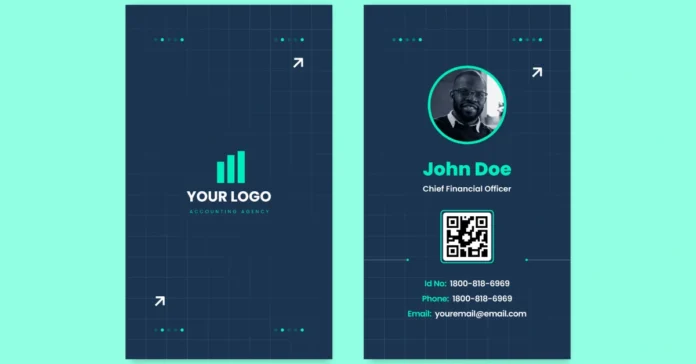
Your digital business card should look polished without feeling cluttered. Keep the design clean, readable, and aligned with your professional personality. You don’t need flashy gradient colors if they don’t match your style. Choose fonts and elements that present you as reliable and easy to work with.
Avoid squeezing everything into one spot. For example:
- Place your name and job title at the top.
- Group your contact info together for quick scanning.
- Keep your website URL and social media profiles in a separate, organized section.
If you want to get creative, multimedia features like inline images, YouTube videos, or short introductions can work well, but only when they serve a clear purpose. Every element should help someone understand who you are or how to reach you.
Use QR Codes for Fast Access
QR codes make your digital card incredibly easy to share. They also work well for people who aren’t familiar with contact download tools. You can set up a static QR code or explore dynamic QR codes if you want the ability to update your details without creating a new image every time.
A QR code generator helps you produce a code that leads directly to your virtual business card, website URL, or contact info page. Add your QR code to your email signature, marketing collateral, or even printed materials. This helps connect your offline and online presence seamlessly.
If you want deeper insights, some platforms offer analytics tracking that shows engagement data, like how many people scanned your code or opened your card. This helps you understand how well your networking efforts are working.
Optimize for Mobile Devices
Most people will open your digital card on their phone, so mobile optimization is essential. Make sure the font sizes are readable, the layout doesn’t require zooming, and all buttons are easy to tap. A frustrating user experience can make someone close your card quickly and forget to save your details.
Mobile-friendly cards load quickly, preview correctly, and show clear contact sharing options. If your platform allows dragging and dropping elements or customizing your interactive webpage, take the time to preview everything on a phone before sharing it widely. Confirm that all content loaded properly and that there aren’t broken links or slow-loading sections.
The Bottom Line
A digital business card gives you a simple, professional way to share who you are and how people can reach you. With the right format, thoughtful design, and updated contact information, you’ll make every introduction smoother and more memorable. The stronger and clearer your card is, the better your chances of leaving a positive impression that lasts beyond the first meeting.